TURNEOChangelogturneo.com

Product updates

What’s new at Turneo

Features, improvements, and fixes across the Turneo platform — as they ship.

New

Filter the Concierge upsell feed by activity type — plus new analytics
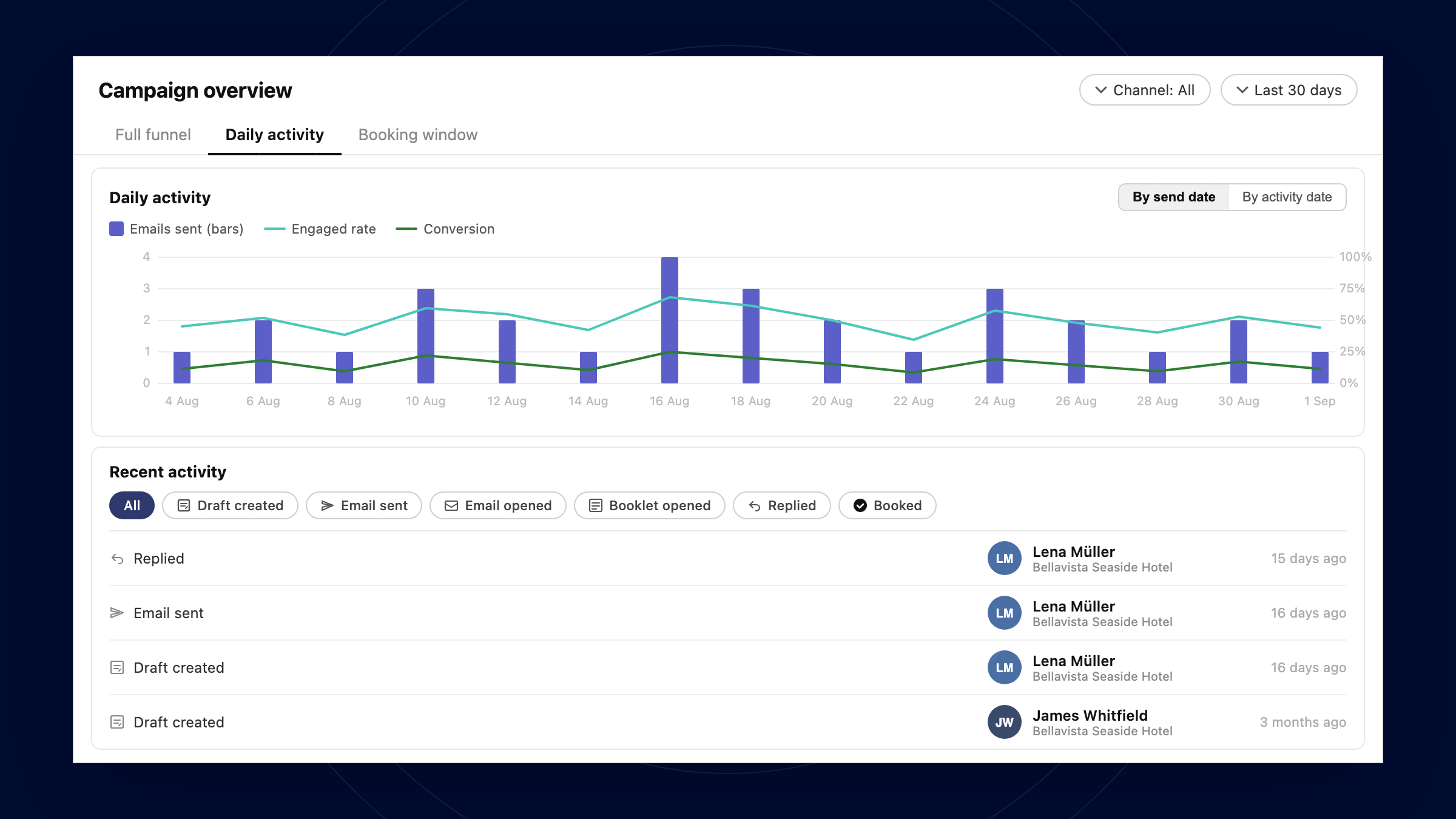
The Recent Activity feed in the Concierge upsell now has an activity type filter. Instead of scrolling through every offer, concierge staff can select one or more activity types and the feed instantly updates to show only the matching results - making it easier to focus on the categories most relevant to a guest's interests.

Alongside the filter, the Concierge upsell gains new analytics sections. Teams can now track sends and bookings day by day, and see an analysis of the best times to send the upsell email - giving a clearer picture of what's working and when.

Both features are available now in the Concierge upsell. No setup is required.

Group bookings by booking channel (Concierge vs…, API respects Element order when filtering by…, and more

Week of August 31 · 5 updates

New: Group bookings by booking channel (Concierge vs Guest) in Insights

The insights section in Turneo Hub now support breakdowns by Channel used for bookings - Guest vs Concierge.

New: API respects Element order when filtering by Element

When you filter the experiences list by Element, results now follow the sequence you configured in that Element - including across multiple Elements and paginated responses. An explicit sort parameter still takes precedence.

Fixed: Automatic refunds when an availability slot is cancelled

Cancelling an availability slot now automatically refunds all affected guests, including cases where the slot is cancelled after the experience has started. The calendar no longer offers to reopen sales on a cancelled slot.

Fixed: Stop sales slots no longer show "Cancelled" on the calendar

Stopping sales on a calendar slot no longer displays a "Cancelled" label, but instead says "Sales stopped". Organizers can now clearly distinguish between stopped-sales slots and genuinely cancelled slots.

NewOption ID visible on rate option cards

The option ID is now displayed beneath the option name on each rate option card in the experience detail view. No more switching tabs to look up an ID — it's right there on the card.